Our Docuprint C2100 is true survivor and is working as well as when it was purchased nearly 10 years ago.
The world has moved on a bit and printing for Mac OSX 10.13 is seemingly not as straight forward as it should be. For the second time in two years I had to troubleshoot getting printing to work so it’s time to document.
The Apple distributed Fuji Xerox driver package yielded errors and the Fuji Xerox package for OSX 10.6 also yielded errors with no print.
Step 1 – Reset Printing System
For me it was to reset the printing system to undo what had been attempted with other drivers. To achieve this right click on the Printers window in Printers & Scanners under System Preferences. Warning – this will remove all configured printers.
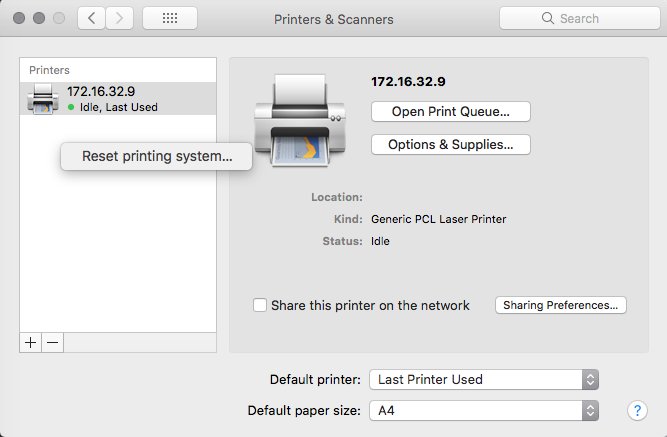
Step 2 – Configure Generic PCL Laser Printer
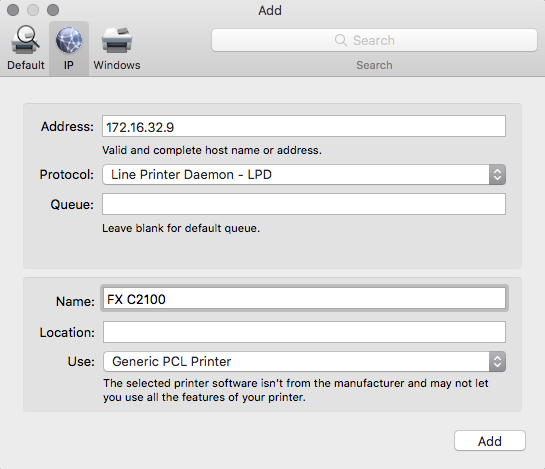
After resetting and removing the drivers add a new Generic PCL Laser Printer. Our printer is on a fixed IP address 172.16.32.9 and the following settings were applied
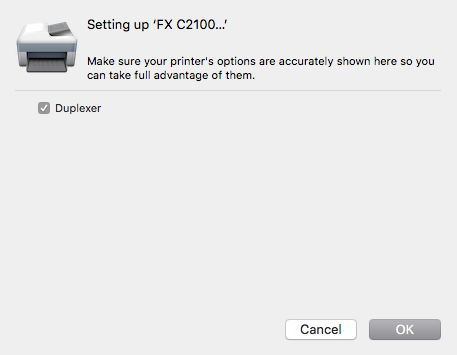
The duplexer setting appears for selection. The C2100 has duplex printing.
Job jobbed!
The C2100 is a colour printer and colour printing is not available using the generic driver but that is ok for me. I can live with this provided I can duplex print. If you have mixed network of Windows and Mac machines you can print to shared Windows printers provided the Windows machine is running and the C2100 drivers have been setup for shared access.
